Digital waitlists for your HOA
Waitlists make it easy to manage storage rooms, parking spots, or housing interest lists. Create lists, receive sign-ups, approve applicants, and keep the order clear. All in one system.
This function is free and included in all our plans.
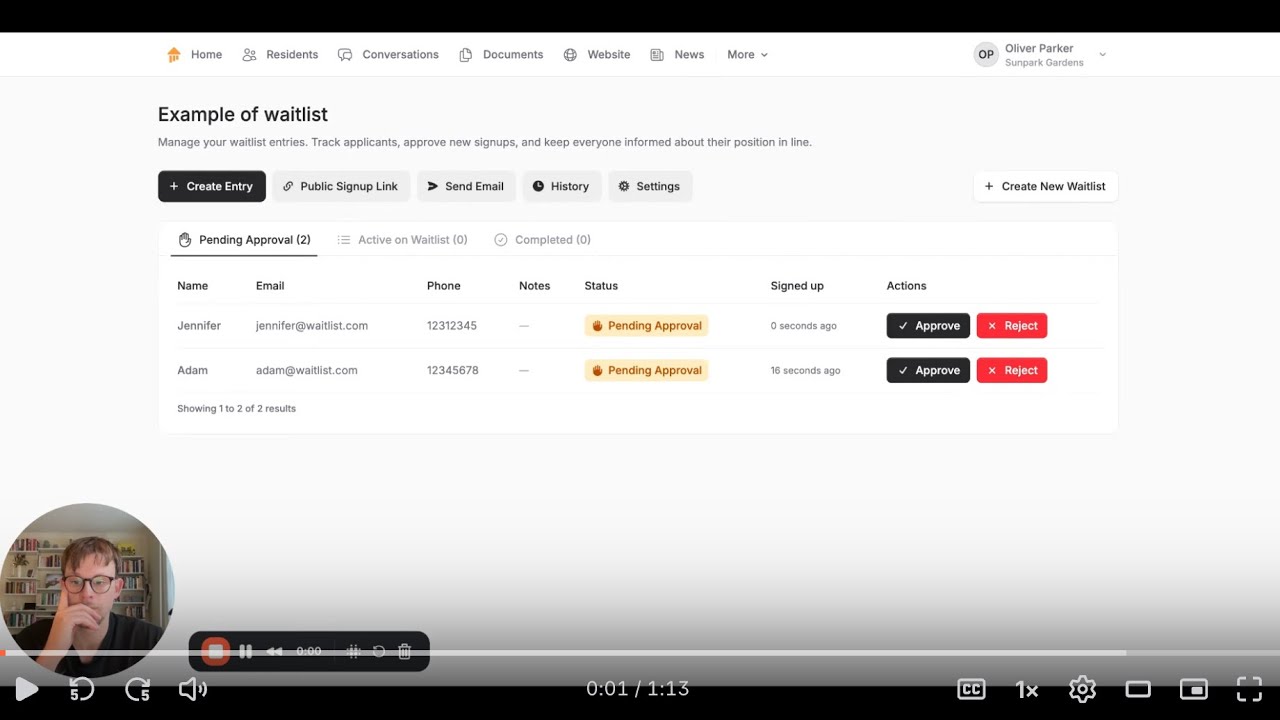
Waitlists that are actually easy to work with
One unified solution for all your HOA’s waitlists. Simple setup, full overview, and a clear order.
Multiple waitlists
Create as many lists as your HOA needs.
Public sign-up
Share a link on your website or in an email.
Board approval
Require the board to approve sign-ups.
Automatic emails
Notifications for new sign-ups and confirmations.
Automatic ordering
The system always shows the correct queue number.
Assign or close
Mark applicants as declined or assigned.

How waitlists work
When the waitlist module is activated, your HOA can create new waitlists with a name and choose whether the list should be public or internal. If made public, a link is generated that can be shared or added to your website. Applicants can sign up through the link and will automatically receive an email asking them to confirm their sign-up. The board can decide whether sign-ups must be approved first. All applicants are placed in the correct order automatically, and the board can assign a spot or decline them with one click.
How waitlists can be used in your HOA
Waitlists help your HOA keep track of storage rooms, parking spots, and housing interest lists without clutter or manual work. The module gathers all sign-ups in one place with a transparent and fair order.
🏘 Storage rooms and basement units
HOAs with limited storage rooms can create a waitlist where residents easily sign up. When a room becomes available, the person at the top is marked as “assigned,” and the list updates automatically. This creates a transparent process without spreadsheets or doubts about the order.
Why waitlists make everyday management easier
Waitlists provide a simple, transparent way to organize high-demand resources. Instead of manual messages, scattered notes, or old paper lists, the board gets one unified system where sign-ups, ordering, and updates stay together. It saves time, reduces errors, and makes it easy to document who was offered what.
- Fair and clear order: The system handles everything automatically.
- Easy administration: Close, assign, and create new lists with just a few clicks.
- Secure digital sign-up: Email confirmation ensures accurate information.
What other HOAs say
Waitlists are one of the most requested modules among HOAs looking to simplify and streamline their administration.
Our HOA does not want a website, but Anyhoa covers our need for an internal portal only accessible for our residents. The site is constantly being developed and our requests for changes / improvements are taken seriously. Support is quick with help and guidance, and you feel well taken care of.
Anne-Marie
President
Fantastic, fast and genuinely professional service. It’s sure to become a great website for our homeowners association. A one‑stop hub where it’s easy to find what you need, and just as easy to share a message or news with everyone. Highly recommended.
Susanne
President
Get started with waitlists
Creating and managing waitlists in Anyhoa is simple. Activate the module, create your first list, and share the link if it should be public. The system handles everything else from sign-ups, confirmations, and order.
FAQ about waitlists
Here you’ll find answers to the most common questions about setting up and using waitlists. Feel free to reach out if you need additional information.
Can we have multiple waitlists?
Yes. You can create as many waitlists as your HOA needs — for storage rooms, parking, shared facilities, or housing interest lists. All lists are managed together, and each has its own settings for public sign-up, approval requirements, and notifications. This gives full flexibility.
How does public sign-up work?
If a waitlist is set to public, it is given a unique link that can be shared on your HOA’s website or sent to interested applicants. They sign up through a simple form and receive an automatic email asking them to confirm their sign-up. This reduces errors and ensures accurate information.
Can the board require approval before someone enters the list?
Yes. You can enable board approval. This means applicants won’t appear on the list until a board member has approved them. This is useful for HOAs that need to verify who is added or use the list for housing interest.
What happens when someone is assigned a spot?
When the board chooses “Assign spot,” the applicant is automatically moved from “Active” to “Completed.” This serves as documentation that the person was either given the spot or declined. The order updates instantly, moving the next person up. It makes the whole process fair and easy to follow.
Ready to get started?
Choose a package and get started right away, or reach out to co-founder Oliver Lindebod.
